Table of Contents
Goals
This article motivates developers to adopt integration testing by explaining how to write, run, and evaluate the results of integration tests.
Quick reference
- colcon is used to build and run test
- pytest is used to eventually execute the test, generate jUnit format test result and evaluate the result
- unit testing describes testing big picture
Introduction
This article motivates developers to adopt integration testing by explaining how to write, run, and evaluate the results of integration tests.
Quick reference
- colcon is used to build and run the tests
integration_testsis used to specify tests in the CMakeLists.txt files- pytest is used to eventually execute the test, generate jUnit format test result, and evaluate the result
Integration testing
An integration test is defined as the phase in software testing where individual software modules are combined and tested as a group. Integration tests occur after unit tests, and before validation tests.
The input to an integration test is a set of independent modules that have been unit tested. The set of modules are tested against the defined integration test plan, and the output is a set of properly integrated software modules that are ready for system testing.
Value of integration testing
Integration tests determine if independently developed software modules work correctly when the modules are connected to each other. In ROS 2, the software modules are called nodes.
Integration tests help to find the following types of errors:
- Incompatible interaction between nodes, such as non-matching topics, different message types, or incompatible QoS settings
- Reveal edge cases that were not touched with unit tests, such as a critical timing issue, network communication delay, disk I/O failure, and many other problems that can occur in production environments
- Using tools like
stressandudpreplay, performance of nodes is tested with real data or while the system is under high CPU/memory load, where situations such asmallocfailures can be detected
With ROS 2, it is possible to program complex autonomous driving applications with a large number of nodes. Therefore, a lot of effort has been made to provide an integration test framework that helps developers test the interaction of ROS2 nodes.
Integration test framework architecture
A typical integration test has three components:
- A series of executables with arguments that work together and generate outputs
- A series of expected outputs that should match the output of the executables
- A launcher that starts the tests, compares the outputs to the expected outputs, and determines if the test passes
A simple example
The simple example consists of a talker node and a listener node. Code of the talker and listener is found in the ROS 2 demos repository.
The talker sends messages with an incrementing index which, ideally, are consumed by the listener.
The integration test for the talker and listener consist of the three aforementioned components:
- Executables:
talkerandlistener - Expected outputs: two regular expressions that are expected to be found in the
stdoutof the executables:Publishing: 'Hello World: ...'for thetalkerI heard: [Hello World: ...]for thelistener
- Launcher: a launching script in python that invokes executables and checks for the expected output
- Note
- Regular expressions (regex) are used to match the expected output pattern. More information about regex can be found at the RegExr page.
The launcher starts talker and listener in sequence and periodically checks the outputs. If the regex patterns are found in the output, the launcher exits with a return code of 0 and marks the test as successful. Otherwise, the integration test returns non-zero and is marked as a failure.
The sequence of executables can make a difference during integration testing. If exe_b depends on resources created by exe_a, the launcher must start executables in the correct order.
Some nodes are designed to run indefinitely, so the launcher is able to terminate the executables when all the output patterns are satisfied, or after a certain amount of time. Otherwise, the executables have to use a runtime argument.
Integration test framework
This section provides examples for how to use the integration_tests framework. The architecture of integration_tests framework is shown in the diagram below.
Integration test with a single executable
The simplest scenario is a single node. Create a package named my_cool_pkg in the ~/workspace directory; it's recommended to use the package creation tool.
my_cool_pkg has an executable that prints Hello World to stdout. Follow the steps below to add an integration test:
- Create a file
~/workspace/src/my_cool_pkg/test/expected_outputs/my_cool_pkg_exe.regexwith the contentHello\sWorld- The string in the file is the regular expression to test against the
stdoutof the executable
- The string in the file is the regular expression to test against the
- Under the
BUILD_TESTINGcode block, add a call tointegration_teststo add the testset(MY_COOL_PKG_EXE "my_cool_pkg_exe")add_executable(${MY_COOL_PKG_EXE} ${MY_COOL_PKG_EXE_SRC} ${MY_COOL_PKG_EXE_HEADERS})...find_package(integration_tests REQUIRED)integration_tests(EXPECTED_OUTPUT_DIR "${CMAKE_SOURCE_DIR}/test/expected_outputs/"COMMANDS"${MY_COOL_PKG_EXE}")... - Build
~/workspace/, or just themy_cool_pkgpackage, usingcolcon:$ ade enterade$ cd ~/workspace/ade$ colcon build --merge-install --packages-select my_cool_pkg - Run the integration test $ ade enterade$ cd ~/workspace/ade$ colcon test --merge-install --packages-select my_cool_pkg --ctest-args -R integration...Starting >>> my_cool_pkgFinished <<< my_cool_pkg [4.79s]Summary: 1 package finished [6.30s]
- Note
- Use
--ctest-args -R integrationto run integration tests only.
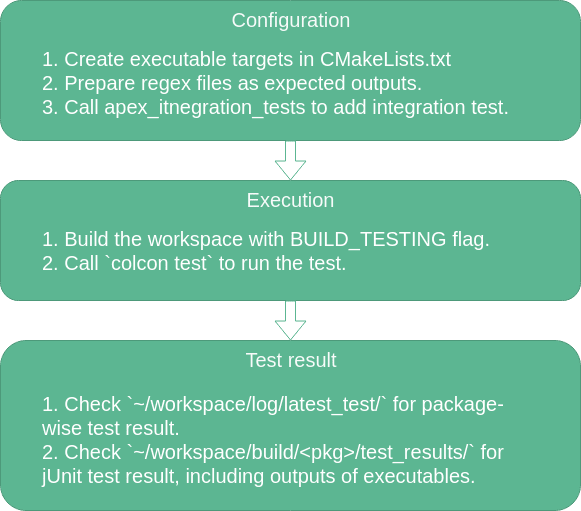
colcon test parses the package tree, looks for the correct build directory, and runs the test script. colcon test generates a jUnit format test result for the integration test.
By default colcon test gives a brief test report. More detailed information exists in ~/workspace/log/latest_test/my_cool_pkg, which is the directory that holds the directories ctest, stdout, and stderr output. Note that these directory only contains output of ctest, not the output of tested executables.
command.logcontains all the test commands, including their working directory, executables, argumentsstderr.logcontains the standard error ofcteststdout.logcontains the standard output ofctest
The stdout of the tested executable is stored in the file ~/workspace/build/my_cool_pkg/test_results/my_cool_pkg/my_cool_pkg_exe_integration_test.xunit.xml using jUnit format:
test_executable_i corresponds to the (i+1)th executable. In this case, only one executable is tested so i starts from 0. Note that test_executable_0 prints Hello World to stdout, which is captured by the launcher. The output matches the regex Hello\sWorld specified in the expected output file. The launcher then broadcasts a SIGINT to all the test executables and marks the test as successful. Otherwise, the integration test fails.
- Note
SIGINTis broadcast only if the output of the last executable matches its regex.
For detailed information about how integration_tests operates, see the Q&A section below.
Integration test with multiple executables
In the my_cool_pkg example, only one executable is added to the integration test. Typically, the goal is to test the interaction between several executables. Suppose my_cool_pkg has two executables, a talker and a listener which communicate with each other with a ROS2 topic.
The launcher starts the talker and listener at the same time. The talker starts incrementing the index and sending it to the listener. The listener receives the index and prints it to stdout. The passing criteria for the test is is if listener receives the indices 10, 15, and 20.
Here are the steps to add multiple-executable integration tests:
- Create two files
~/workspace/src/my_cool_pkg/test/expected_outputs/talker_exe.regexwith content.*~/workspace/src/my_cool_pkg/test/expected_outputs/listener_exe.regexwith content101520
- Under the
BUILD_TESTINGcode block, callintegration_teststo add the test...find_package(integration_tests REQUIRED)integration_tests(EXPECTED_OUTPUT_DIR "${CMAKE_SOURCE_DIR}/test/expected_outputs/"COMMANDS"talker_exe --topic TOPIC:::listener_exe --topic TOPIC")...- The character set
:::is used as delimiter of different executables integration_testsparses the executables, arguments, and composes a valid test python script- More information about the python script can be found in the Q&A section
- The character set
- Build
~/workspace/, or just themy_cool_pkgpackage, usingcolcon:$ ade enterade$ cd ~/workspace/ade$ colcon build --merge-install --packages-select my_cool_pkg - Run the integration test $ ade enterade$ cd ~/workspace/ade$ colcon test --merge-install --packages-select my_cool_pkg --ctest-args -R integrationStarting >>> my_cool_pkgFinished <<< my_cool_pkg [20.8s]Summary: 1 package finished [22.3s]
When the environment is properly configured, after 20 seconds, the integration test shall pass. Similar to the single node example, the launcher starts the talker and listener at the same time. The launcher periodically checks the stdout of each executable.
The regex of talker is .*, which always matches when the first output of talker is captured by launcher. The regex of listener is 10, 15, and 20. After all entries in this regex are matched, a SIGINT is sent to all commands and the test is marked as successful.
The locations of output files are the same with single executable example. Output of ctest is is ~/workspace/log/latest_test/my_cool_pkg/. Output of tested executables is stored in ~/workspace/build/my_cool_pkg/test_results/my_cool_pkg/ in jUnit format.
- Note
- By the time
SIGINTis sent, all the regex have to be successfully matched in the output. Otherwise the test is marked as failed. For example, if the regex fortalkeris30, the test will fail.
Use executables from another package
Sometimes an integration test needs to use executables from another package. Suppose my_cool_pkg needs to test with the talker and listener defined in demo_nodes_cpp. These two executables must be exported by demo_nodes_cpp and then imported by my_cool_pkg.
When declaring the test, a namespace must be added before talker and listener to indicate that executables are from another package.
Use the following steps to add an integration test:
- Add
<buildtool_depend>ament_cmake</buildtool_depend>to~/workspace/src/demo_nodes_cpp/package.xml - In
~/workspace/src/demo_nodes_cpp/CMakeLists.txt, export the executable target before callingament_package()install(TARGETS talker EXPORT talkerDESTINATION lib/${PROJECT_NAME})install(TARGETS listener EXPORT listenerDESTINATION lib/${PROJECT_NAME})find_package(ament_cmake REQUIRED)ament_export_interfaces(talker listener) - Create two regex files
~/workspace/src/my_cool_pkg/test/expected_outputs/demo_nodes_cpp__talker.regexwith content.*~/workspace/src/my_cool_pkg/test/expected_outputs/demo_nodes_cpp__listener.regexwith content20
- In
~/workspace/src/my_cool_pkg/package.xml, add the dependency todemo_nodes_cpp<test_depend>demo_nodes_cpp</test_depend> - Under the
BUILD_TESTINGcode block in~/workspace/src/my_cool_pkg/CMakeLists.txt, callintegration_teststo add the test...find_package(integration_tests REQUIRED)find_package(demo_nodes_cpp REQUIRED) # this line imports targets(talker) defined in namespace demo_nodes_cppintegration_tests(EXPECTED_OUTPUT_DIR "${CMAKE_SOURCE_DIR}/test/expected_outputs/"COMMANDS"demo_nodes_cpp::talker:::demo_nodes_cpp::listener" # format of external executable is namespace::executable [--arguments])... - Build
~/workspace/, or just themy_cool_pkgpackage, usingcolcon:$ ade enterade$ cd ~/workspace/ade$ colcon build --merge-install --packages-select my_cool_pkg - Run the integration test $ ade enterade$ cd ~/workspace/ade$ colcon test --merge-install --packages-select my_cool_pkg --ctest-args -R integration
When ament_export_interfaces(talker listener) is called in demo_nodes_cpp, ament generates a demo_nodes_cppConfig.cmake file which is used by find_package. The namespace in this file is demo_nodes_cpp. Therefore, to use executable in demo_nodes_cpp, a namespace and :: has to be added.
The format of an external executable is namespace::executable --arguments. The integration_tests function sets the regex file name as namespace__executable.regex. One exception is that no namespace is needed for executable defined in the package that adds this integration test.
Add multiple integration tests in one package
If my_cool_pkg has multiple integration tests added with the same executable but different parameters, SUFFIX has to be used when calling integration_tests.
Suppose my_cool_pkg has an executable say_hello which prints Hello {argv[1]} to the screen. Here are the steps to add multiple integration tests:
- Create two regex files
~/workspace/src/my_cool_pkg/test/expected_outputs/say_hello_Alice.regexwith contentHello\sAlice~/workspace/src/my_cool_pkg/test/expected_outputs/say_hello_Bob.regexwith contentHello\sBob
- Call
integration_teststo add integration testintegration_tests(EXPECTED_OUTPUT_DIR "${CMAKE_SOURCE_DIR}/test/expected_outputs/"COMMANDS "say_hello Alice"SUFFIX "_Alice")integration_tests(EXPECTED_OUTPUT_DIR "${CMAKE_SOURCE_DIR}/test/expected_outputs/"COMMANDS "say_hello Bob"SUFFIX "_Bob") - Build
~/workspace/, or just themy_cool_pkgpackage, usingcolcon:$ ade enterade$ cd ~/workspace/ade$ colcon build --merge-install --packages-select my_cool_pkg - Run the integration test $ ade enterade$ cd ~/workspace/ade$ colcon test --merge-install --packages-select my_cool_pkg --ctest-args -R integration
By specifying SUFFIX, integration_tests adds the correct suffix to the regex file path.
Q&A
How does integration_tests work
integration_tests is a wrapper of ament_add_pytest_test. integration_tests receives organized commands, test name, and expected outputs as arguments.
The arguments include:
TESTNAME: optional, a string of integration test nameEXPECTED_OUTPUT_DIR: required, an absolute path where the expected output files are stored- Files under this directory will be copied to
~/workspace/build/package-name/expected_outputs/with the suffix added
- Files under this directory will be copied to
COMMANDS: required, a series of:::separated commands- For example,
talker_exe --topic TOPIC:::${LISTENER_EXE} --topic TOPIC
- For example,
SUFFIX: optional, a string that will be appended to the regex file name
When integration_tests is called by my_cool_pkg with correct arguments:
integration_testssplitsCOMMANDSusing:::, so thattalker_exe --topic TOPIC:::${LISTENER_EXE} --topic TOPICbecomes a list:talker_exe --topic TOPIC;listener_exe --topic TOPIC- Next
integration_testssplits each command by a space, and extracts the executables and arguments integration_testsreplaces each executable with generator_expression$<TARGET_FILE:${executable}>- Using this method, cmake is able to find the path to the executable
- If
EXPECTED_OUTPUT_DIRis specified,integration_testscopies files underEXPECTED_OUTPUT_DIRto~/workspace/build/my_cool_pkg/expected_outputs/with the proper suffix integration_testsgenerates a list of expected regex files, each of which has the following format:~/workspace/build/my_cool_pkg/expected_outputs/[namespace__]executable[SUFFIX]integration_testsconfigures a python scripttest_executables.py.inthat uses ROS launch to start all processes and checks the outputs
How are regex files prepared
The simplest way to prepare a regex file corresponding to an executable is to put it under ~/workspace/src/package-name/test/expected_outputs/ and pass this as EXPECTED_OUTPUT_DIR to integration_tests. If this file needs to be generated dynamically, the upstream package can create the file ~/workspace/build/package -name/expected_outputs/executable[suffix].regex with the expected regex. integration_tests doesn't care how this file is generated, as long as it's in the correct place.
How is the regex file handled
A regex file will first be delimited by a line break and then stored in a list. Every time the launcher gets a callback from stdout, the launcher tries to match each regex in the list against stdout and removes the regex that gets matched from the list.
When the regex list of the last executable becomes empty, a SIGINT is broadcast to all executables. The test is marked as passed successfully if the regex lists of all executables are empty, and a SIGINT is broadcast to all executables.